SA Motion

Route the right interaction to the right agent, across every channel.

SA Hosted's SA Motion engine manages voice, SMS, email, web chat, and WhatsApp through a single omnichannel contact management layer. Every channel gets the same routing logic, the same agent interface, and the same contact history — so customers don't have to repeat themselves and agents don't have to switch tools.

Discuss Your Channels Full VCC Platform

What is SA Motion?

SA Motion is SA Hosted's omnichannel contact management engine. It handles inbound and outbound interactions across voice, SMS, email, web chat, and WhatsApp, applying consistent routing logic and delivering every interaction to the agent desktop with full contact history. SA Motion is the layer that turns separate communication channels into a unified customer experience.

Supported Channels

Every channel your customers use, in one system.

Voice

Inbound and outbound calling with skills-based routing, priority queueing, virtual call queueing, callbacks, and IVR self-service.

SMS & Text

Two-way SMS messaging routed through the same queue management system as voice, with full conversation history in the agent desktop.

Email

Inbound email managed through the same routing and queueing engine as other channels, with response tracking and conversation threading.

Web Chat

Live chat embedded in customer-facing websites, routed into the same agent queue as voice and messaging contacts.

WhatsApp

WhatsApp Business messaging handled through the same omnichannel routing layer, with agent access via the unified desktop.

Unified Contact History

Every channel interaction stored in one contact record. Agents see the full history regardless of which channel the customer used last.

Routing Logic

Route every interaction to the right agent, every time.

SA Motion applies configurable routing rules across all channels. Agents can be assigned to handle specific channel types, skill sets, languages, or client accounts. When volume spikes or queues exceed thresholds, overflow rules redirect interactions without manual intervention.

  • Skills-based routing assigns interactions to agents with the right capability
  • Priority queueing holds high-value customers or urgent cases at the front
  • Virtual call queueing offers callbacks so customers don't wait on hold
  • Overflow rules redirect when queues exceed configured thresholds
  • IVR self-service routes or resolves contacts before they reach an agent
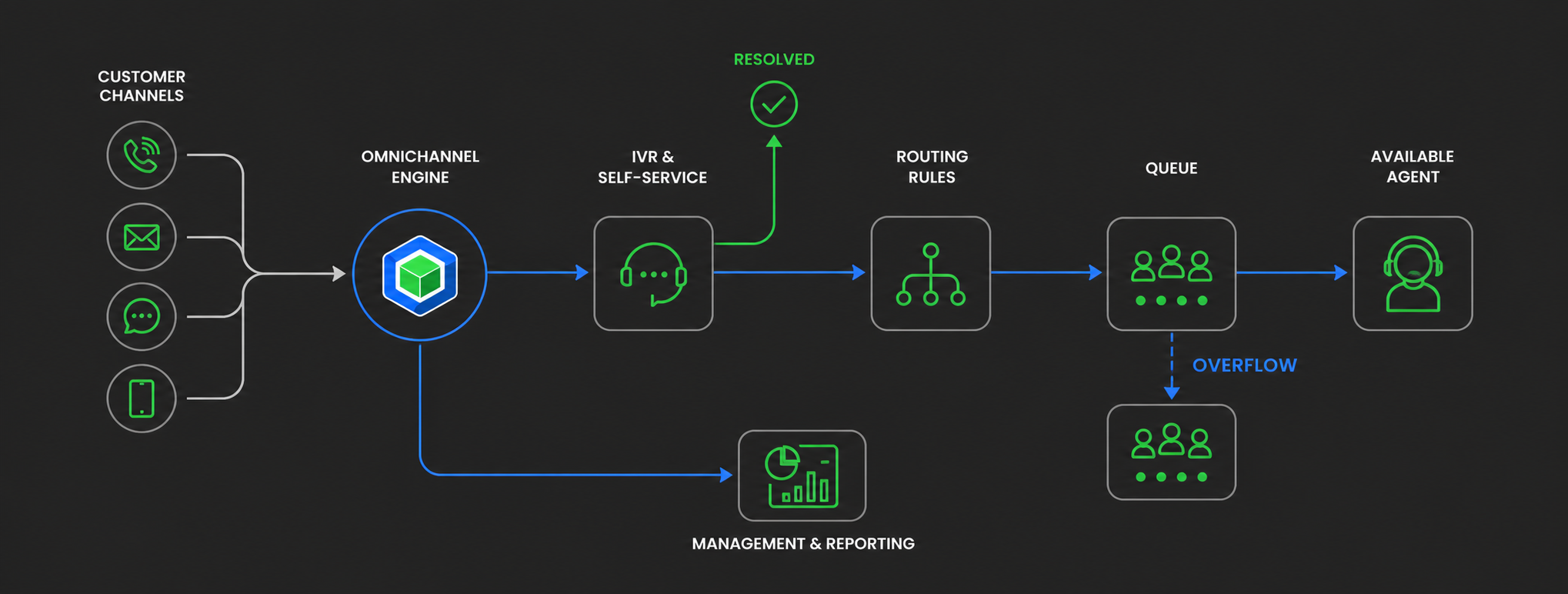
Omnichannel Engine showing flow from customer channels through omnichannel engine, IVR, routing, queue, and available agents

What types of businesses use an omnichannel contact center platform?

Omnichannel contact center platforms are used by BPOs, in-house customer service teams, healthcare support operations, utilities, and any organization whose customers reach out via more than one communication channel. They are especially valuable when agent teams need to manage voice and digital interactions consistently without switching between separate tools for each channel.

Related Solutions

Omnichannel is better with the full platform.

Get Started

See what omnichannel routing looks like for your operation.

Tell us which channels your customers use and how your current routing is set up. We'll help you understand how SA Motion fits.

Talk to SA Hosted All Solutions